Life Care Plan / By Sayera
The whole case.
A clearer plan.
Records, assessments, care costs, finances, and reports for the people in your care—connected in one secure workspace.
For life care planners, guardians and fiduciaries,
case managers, and medical-legal teams.
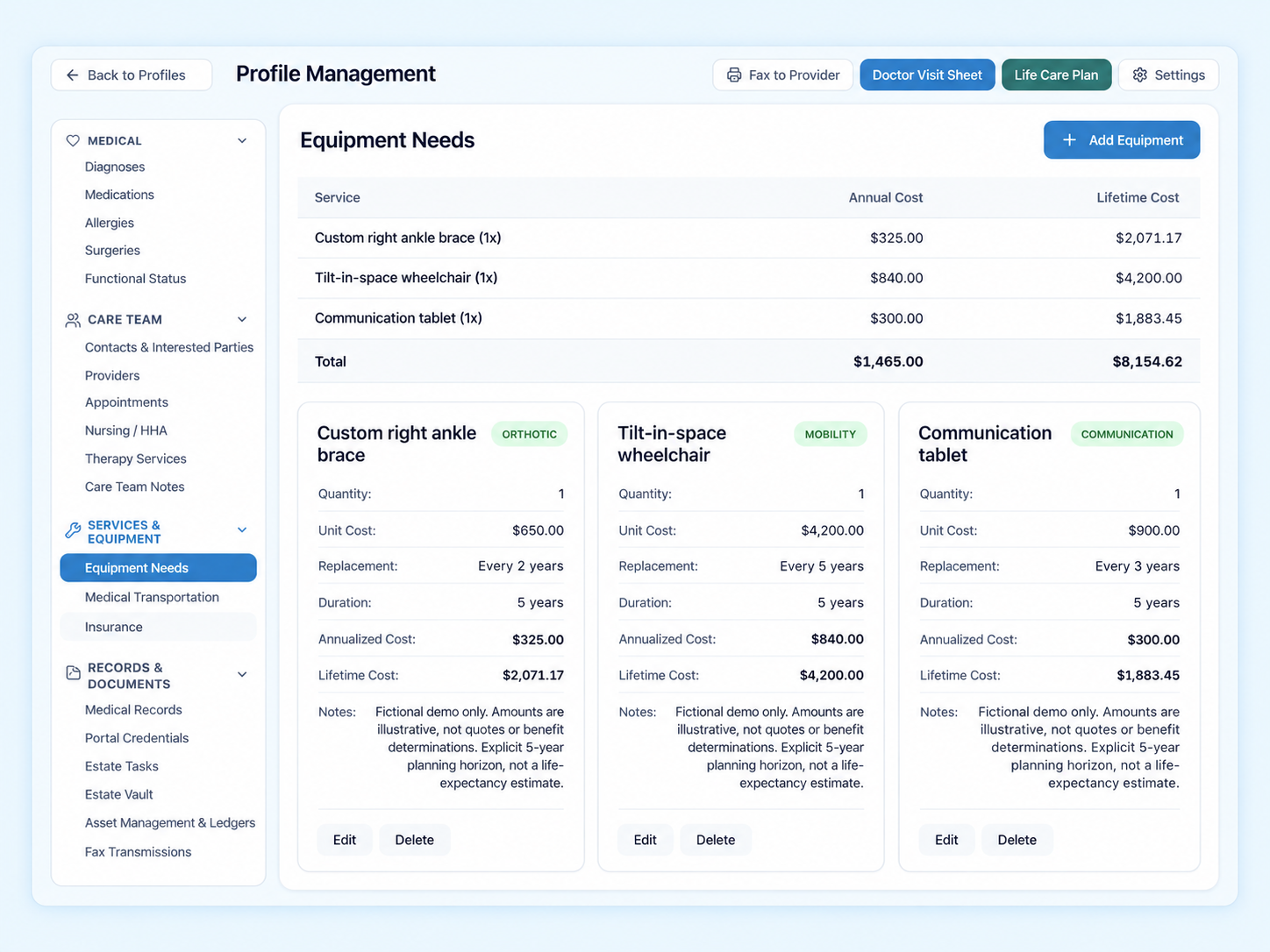
Fictional demo data. Illustrative costs over a five-year planning horizon.
Now retiring
The three-inch binderRetyping the cost tableThe forty-tab spreadsheet“Which version is current?”Hunting for the provider’s fax numberLifetime totals by calculatorRecords in five different foldersReplacement schedules on sticky notes
00 / Why connected
Same details.
Far less digging.
A case lives in a lot of places.
Life Care Plan gives it one.
The same details, spread across an inbox, a binder, and a spreadsheet.
- Referral intake
- Diagnoses, linked to Medications, Planning reports
- Allergies
- Medications, linked to Diagnoses, Providers
- Providers, linked to Medications, Surgeries, Appointments
- Surgeries, linked to Providers
- Appointments, linked to Providers
- Equipment, linked to Cost projections
- Therapy & nursing, linked to Cost projections
- Transportation, linked to Cost projections
- Cost projections, linked to Equipment, Therapy & nursing, Transportation, Planning reports
- Planning reports, linked to Cost projections, Diagnoses
An illustration of how information relates in a case workspace, not a screen from the product.
01 / Explore the product
Follow the details.
Keep the bigger picture.
Explore three parts of the workspace.
Choose a workflow to see it up close.
Inside the workspace / 01
Keep the history in context.
Review medical history alongside the providers, medications, and supporting records behind the case.
- Diagnoses, allergies, surgeries, and functional status
- Medication details with linked providers and diagnoses
- Appointments, provider visit notes, and versioned source documents
- A shared provider directory that flags likely duplicates by NPI
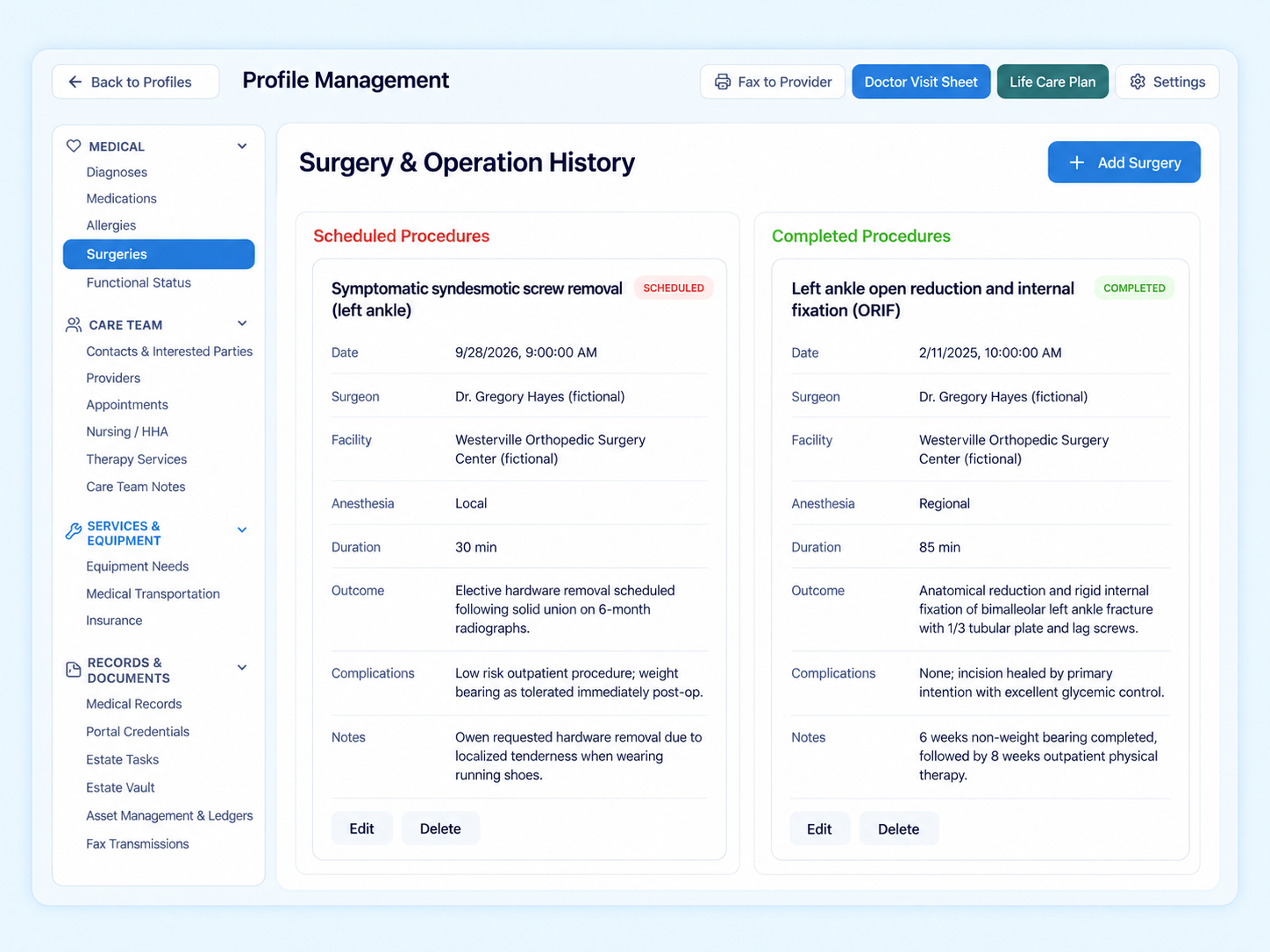
Fictional demo data. Selected procedures reformatted for this overview.
Inside the workspace / 02
Connect care needs to planning costs.
Keep equipment, services, and care-related costs with the case, then review annual and lifetime projections against the resources available to pay for them.
- Nursing, home health, therapy, equipment, and transportation
- Replacement cycles and a 3% annual medical inflation projection
- Lifetime totals compared with liquid assets and the estate
- A printable report with an executive summary and itemized costs
Fictional demo data. Illustrative costs over a five-year planning horizon.
Inside the workspace / 03
Give incoming cases a clear starting point.
Keep referral details with the inquiry as your team reviews it and moves it toward a client profile.
- A public intake form branded for your organization
- Referral sources, inquiry status, and internal reviewer notes
- Conversion from inquiry to client profile
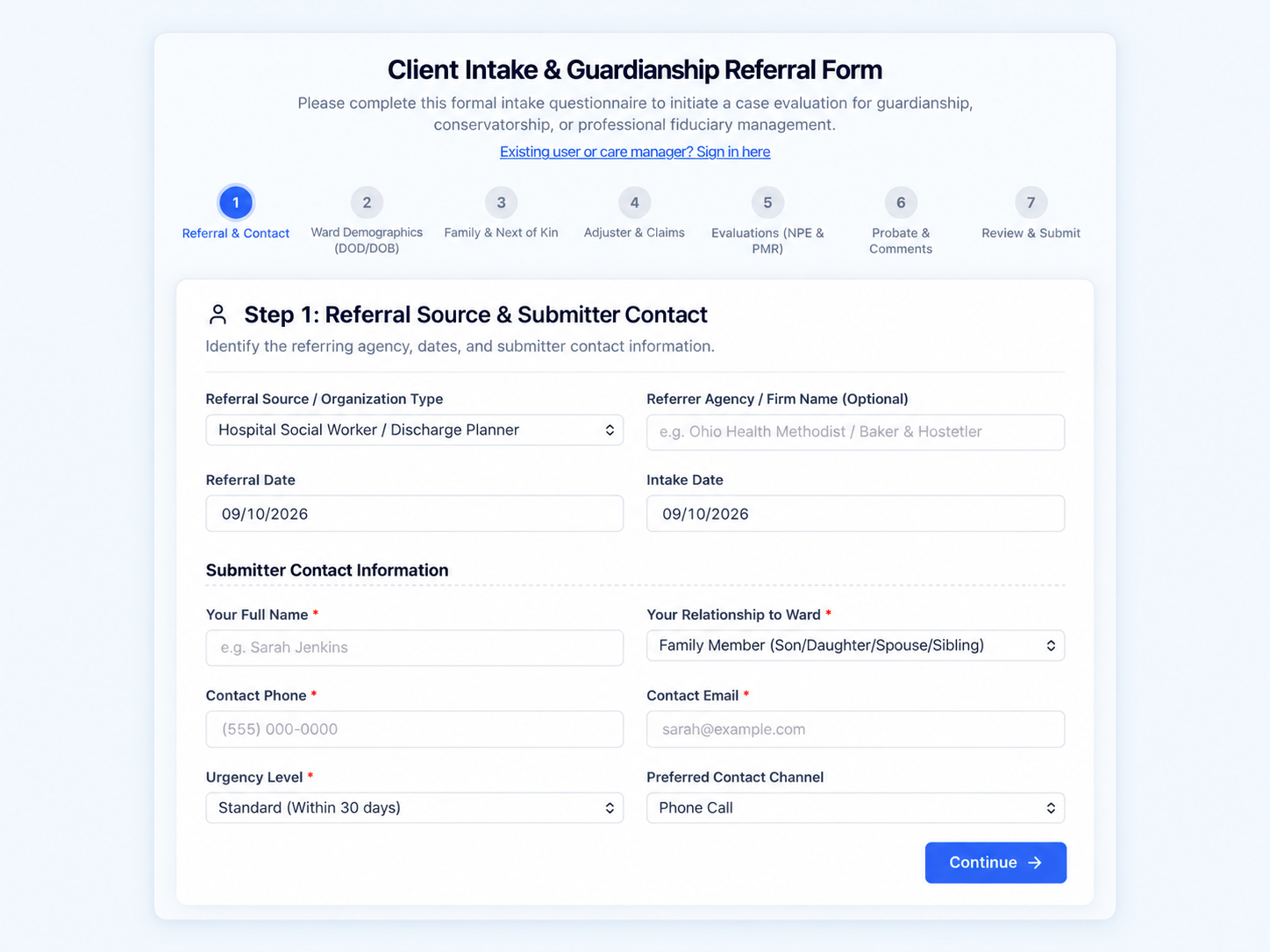
Product render of the referral intake workflow.
02 / Beyond the plan
One record for the
whole person.
The plan is one part of the work.
The same case record supports the rest.
Assessments
Nine structured templates, from ADL & functional and cognitive & behavioral to home environment, caregiver, and safety planning. Save drafts, track progress, and amend with revision history.
AI case summaries
Draft a profile summary, care conference brief, physician visit prep, guardianship summary, functional/ADL summary, or a missing-information check from the full record and uploaded documents.
Translation & plain language
Translate medical content into 11 languages, including Spanish, Haitian Creole, Vietnamese, and Arabic, or rewrite it at a sixth-grade reading level. Risky changes go to a review queue.
Visit-ready documents
Print a doctor visit sheet for appointments and export care team notes. Rich-text notes autosave and hold PDF and image attachments.
Estate & legal
Keep legal documents in an estate vault and work through probate checklists: death certificates, the will, estate EIN, final returns, benefit notices, and retitling.
Client finances
Track assets, bank accounts, ledgers, and reconciliations. Draft, print, void, and reissue checks with an audit trail. QuickBooks Online–ready.
Practice billing
Turn care-note time into billable entries in six-minute increments, with mileage. Invoices, statements, bills, payroll hours, and reports live alongside the cases.
Team & client access
Assign care planners, set per-organization features, and invite the person in your care to their own secure portal login.
Letters of medical necessity
Build a letter from selected chart evidence, with every statement traced to its source. Review, edit, and attest before finalizing; each revision is kept.
Secure fax
Choose clinical sections and records, add a cover note, and preview the packet before sending to a provider. Track status, cancel, or resend from the case.
Turn on what your practice uses.
Modules are enabled per organization. Tell us how your team works and we’ll focus the demo there.
Discuss guardianship and finances
03 / From case to plan
A plan is only as useful
as the work behind it.
Keep that work connected, from the first
case details to an evolving life care plan.
- 01
Organize the case
Bring the client profile, medical history, and care planner assignments together.
A shared starting point - 02
Review the evidence
Keep source documents available and follow links between medications, diagnoses, and providers.
Context for your review - 03
Develop the costs
Maintain equipment, services, transportation, and other care-related costs.
Itemized planning information - 04
Maintain the plan
Review annual and lifetime projections, print the report, and update the case as it changes.
A report you can revisit
04 / Evidence & professional judgment
Assistance where it helps.
Judgment stays human.
Draft case summaries, translate medical content into 11 languages, and simplify clinical language, with the original information available for comparison.
- Original record
- Bilateral lower-extremity edema noted on examination.
- Simplified
- Swelling was seen in both legs during the exam.
Your call. Try it.
The review principle
Return to the source
Compare generated content with the original record and the context of the case.
Review and correct
Edit, approve, or reject flagged translations. Changed numbers, medication names, and ambiguous wording are flagged automatically.
Apply professional judgment
Qualified users remain responsible for decisions and final outputs.
Linked records provide context. A linked provider is not automatically the prescribing physician.
05 / Built for sensitive records
Your organization’s data,
on its own infrastructure.
Safeguards are part of the standard deployment,
not an add-on.
Dedicated deployment
Each organization runs on its own network, database, encryption key, sign-in system, and storage. No shared database between customers.
Encrypted throughout
Data is encrypted with customer-managed keys. Portal logins and bank account numbers get a second layer of field-level encryption.
Strong sign-in
Multi-factor authentication, 12-character passwords, risk-based sign-in protection, and a 15-minute idle timeout.
Audit & recovery
Access is logged without copying health data into the log. Daily backups are retained for 35 days, with point-in-time database recovery.
Describes the platform’s standard deployment. Compliance obligations, including business associate agreements, are confirmed for each organization. Discuss your requirements
Who is Life Care Plan for?
Life care planners, professional guardians and conservators, fiduciaries, rehabilitation consultants, case managers, and medical-legal teams who manage the medical, legal, and financial details behind a person’s care.
What can I see in a demo?
Walk through a case workspace, connected medical records, care needs and costs, and planning reports. Tell us which workflow matters most so we can focus the conversation.
Does it produce life care planning reports?
Yes. The report combines an executive summary, projected care needs, and an itemized cost table with annual and lifetime totals. Projections account for replacement cycles and a 3% annual medical inflation rate, and can be compared with the client’s liquid assets and estate. Review and print the report, then keep the case current as it changes.
Is it only for life care plans?
No. The same record supports guardianship and fiduciary work: assessments, letters of medical necessity, provider faxes, estate and probate tasks, client bank accounts and checks, and billing for your own practice. Turn on the modules your organization uses.
How is AI used?
AI drafts case summaries, translates medical content, and rewrites it in plain language. Original information stays available for comparison, internal identifiers are removed from summaries, and flagged translations can be reviewed, edited, approved, or rejected. Qualified professionals remain responsible for decisions and final outputs.
What about privacy, deployment, and pricing?
Each organization receives its own dedicated deployment with its own encryption key and branding. Bring your access, data handling, and compliance requirements to the demo, and we’ll discuss them and the scope of your use before quoting.
07 / See the workflow live
See Life Care Plan
in action.
Bring the workflow your team wants to improve. Let’s walk through how the platform connects the information behind the plan.
Book a 30-minute demo (opens in a new tab)Choose a time in the booking calendar.
Opens in a new tab.
A useful conversation starts here.
- The case information your team works with
- The handoffs and reviews that take time
- Your access, privacy, and deployment requirements
Prefer to start by email?
Tell us what you’d like to see. We’ll prepare a request for you to review and send.